

Keep track of completed work with checklists in AutoReg
In route-based work, it is often the small details that determine whether a job is done correctly. Is everything done? Is there documentation for it? With checklists in AutoReg, drivers get a clear structure of what needs to be done on each task, and a simple way to show that it was actually done.
Create templates that fit the tasks
As an administrator, you create your own checklist templates and link them to route tasks. You add checkpoints, briefly describe what needs to be done, and determine the order using drag-and-drop. Choose whether the checklist should have a time interval or act as a log.
When the template is ready, you publish it, link it to the correct route, and it becomes available to drivers in the app.
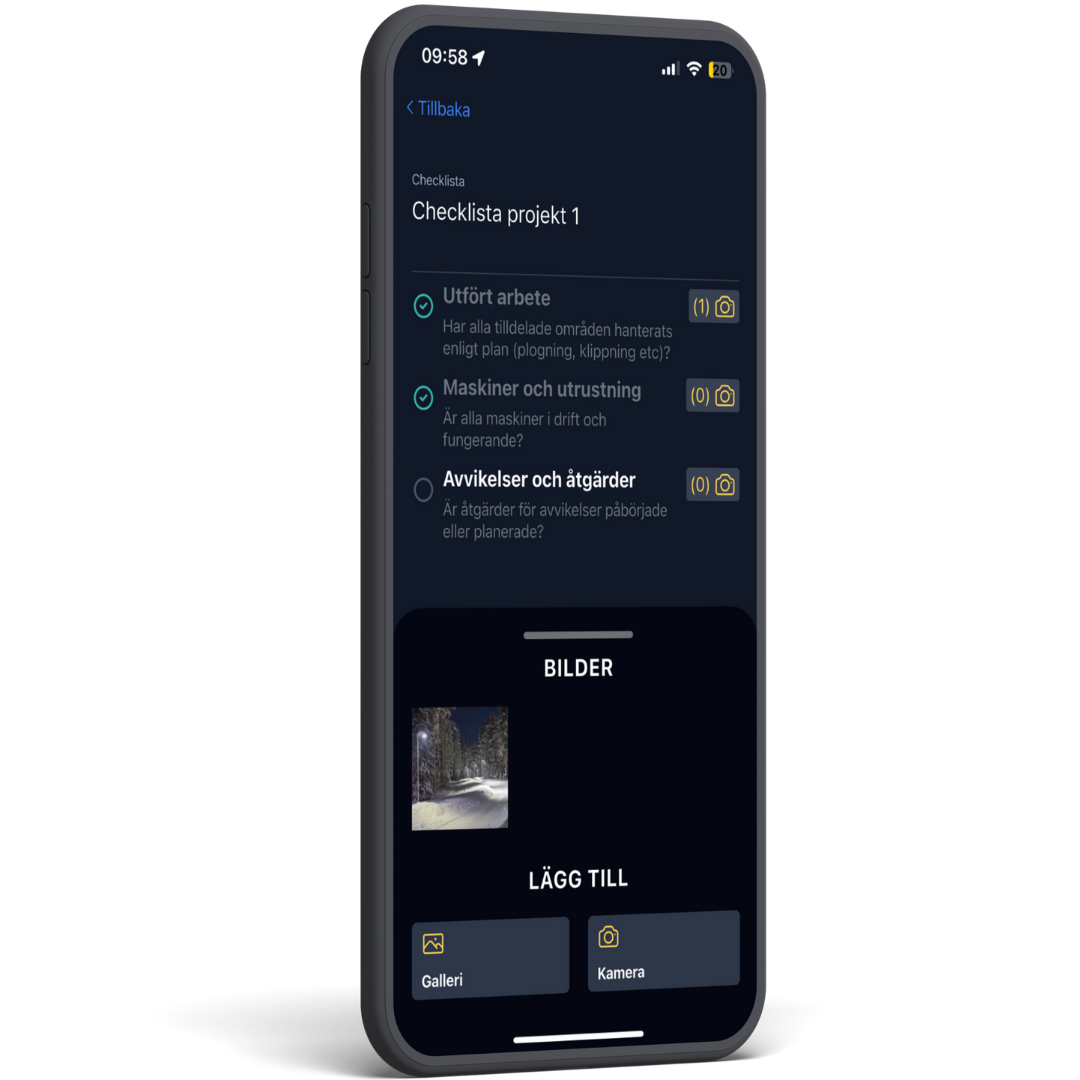
Fill out directly in the app, with image documentation
While on assignment, employees check off items in the app as the work is performed. Photos can be attached to each item so that documentation is gathered in the right place immediately. You don't need to worry about loose notes and subsequent reporting.
Share with subcontractors
Share with subcontractors
Can a subcontractor fill out the same checklist? Just link the checklist to the route, and everyone will work according to the same procedures regardless of who performs the job.
Full overview through log and reports
All completed checklists are gathered in a log where you can filter by period, task, or control point. If you want to compile documentation, you can create a complete checklist report with just a few clicks, ready for sharing or archiving.
 Norsk bokmål
  English
  Svenska